在 Astra 主题免费版中,想要在文章页(Single Post)显示分类和 Tag 标签,最简单且符合规范的方法是将代码添加到子主题的 functions.php 文件中:
/**
 * Astra 主题单篇文章页下方显示分类和标签
 */
function custom_display_tags_and_categories() {
    // 仅在单篇文章页显示
    if ( is_single() ) {
        echo '<div class="custom-post-meta">';

        // 显示分类
        if ( get_the_category() ) {
            echo '<div class="post-categories">' . esc_html__('分类: ', 'astra') . get_the_category_list(', ') . '</div>';
        }

        // 显示标签
        if ( get_the_tags() ) {
            echo '<div class="post-tags">' . get_the_tag_list(esc_html__('标签: ', 'astra') , ', ') . '</div>';
        }

        echo '</div>';
    }
}
// 将此函数挂载到 astra_entry_after (内容下方)
add_action( 'astra_entry_after', 'custom_display_tags_and_categories' );- 代码解释:is_single(): 确保代码只在文章详情页生效,不会显示在首页或文章列表页。
- astra_entry_after: 这是 Astra 主题的一个钩子,表示文章内容之后。
- get_the_category_list / get_the_tag_list: 获取分类和标签的内置 WordPress 函数。
添加 CSS 样式 (让显示更美观)
可以将以下 CSS 代码添加到 外观 > 自定义 > 额外 CSS 中,以美化分类和标签的外观:
.custom-post-meta {
    margin-top: 30px;
    padding-top: 20px;
    border-top: 1px solid #eeeeee;
}
.post-categories, .post-tags {
    margin-bottom: 10px;
    font-size: 14px;
}
.post-categories a, .post-tags a {
    background-color: #f1f1f1;
    padding: 3px 8px;
    border-radius: 3px;
    text-decoration: none;
    margin-right: 5px;
    color: #555;
}
.post-categories a:hover, .post-tags a:hover {
    background-color: #0274be;
    color: #fff;
}
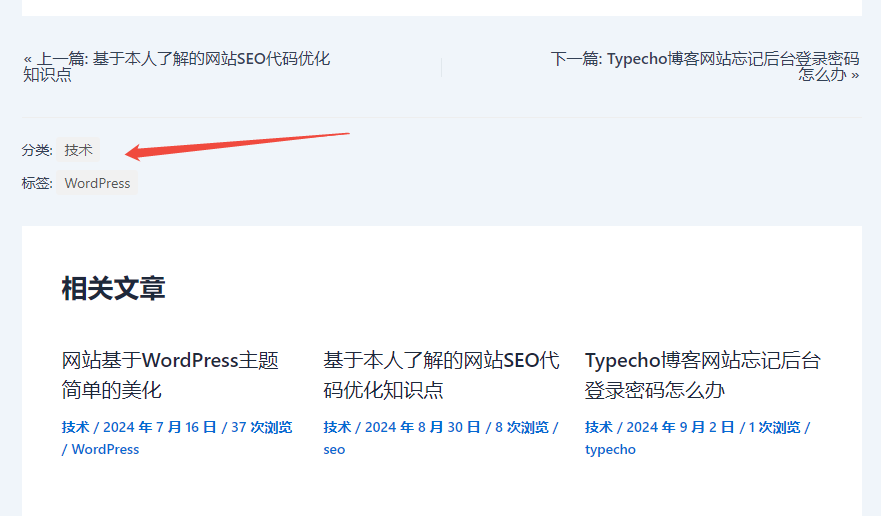
效果如图所示:
👋 感谢您的观看!
© 版权声明
THE END